Category: Web Dev

  • Responsive Web Design Interactive Guide

    Responsive Web Design Interactive Guide

    In a surprising twist, Template Monster, the (in)famous template provider, put together the most complete, interesting and interactive guide to the field of Responsive Web Design. Shaped like a children’s game, you can encounter glossary, blog articles, free PDF books, the official position of Google as well as many tutorials, plugins, tools and ready-made templates.

    [button color=”green” link=”http://www.templatemonster.com/infographics/responsive-web-design-interactive-guide.php”]View the Interactive Guide[/button]

  • Flex Slider 2 – responsive image carousel from WooThemes

    Flex Slider 2 – responsive image carousel from WooThemes

    WooThemes created this great responsive image carousel and gives it away for free. The plugin works with jQuery and it is loaded with many features. It can adapt to various content sizes, can load both images and video and works on all modern browsers.

    [notification type=”information”]Licence: free for personal and commercial use[/notification]


    [button color=”green” link=”http://flexslider.woothemes.com/”]Get Flex Slider 2[/button]

  • Percentage Loader Plugin

    Percentage Loader Plugin

    jQuery.PercentageLoader is a jQuery plugin for displaying a rounded progress widget, different than the classic progress bars. It makes use of HTML5 Canvas and vectors, allowing it to be scaled at will.

    [notification type=”information”]Licence: open source (freeBSD)[/notification]


    [button color=”green” link=”http://widgets.better2web.com/loader/”]Get the Percentage Loader Plugin[/button]

  • Responsive CSS3 Slider

    Responsive CSS3 Slider

    CSScience offers a fully responsive slider created only with CSS3 (and a minor Javascript fix for iOS devices). The functionality is supported in all modern browsers (Firefox, Chrome, Safari and Opera) and IE9 (without transition effects).

    [notification type=”information”]Licence: free for personal and commercial use[/notification]


    [button color=”green” link=”http://csscience.com/responsiveslidercss3/”]Get the Stylish UI Kit[/button]

  • A great way to use icon fonts

    A great way to use icon fonts

    As icon fonts see more and more use , there is an increasing concern on the best way to use them, in a practical and semantic way. With two main categories of clients that don’t see images but only text (search engine robots and screen readers), it is imperative to optimize the process without affecting either the search engine results nor the experience of visitors that use screen readers. Chris Coyier from CSS Tricks puts together such an improved approach, building upon the solutions from other developers.

    [button color=”green” link=” http://css-tricks.com/html-for-icon-font-usage/”]Read the best way to use icon fonts[/button]

  • Google+ Style User Interface

    Google+ Style User Interface

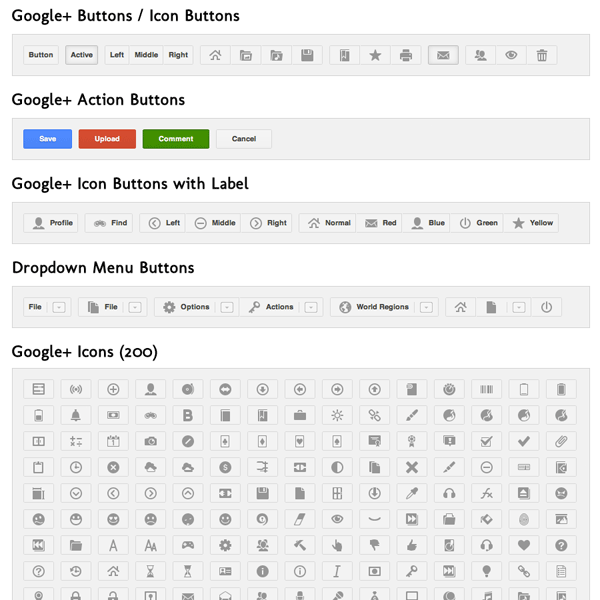
    Bruce Galpin from Social-IT-e Media offers this easily customizable framework of Google+ style buttons, icon buttons and drop-down menus. The code is free to use in commercial projects and can be forked from GitHub.

    [button color=”green” link=”http://shrapp.nl/post/google-plus-ui-buttons”]Get the Google+ Style UI[/button]

  • Modernizr

    Modernizr

    Monernizr is what people in the field call a “polyfill” – a javascript library that detects what your browser is capable of and allows you to take special actions if necessary to compensate for the lack of support for the latest HTML5 and CSS3 features.

    [button color=”green” link=”http://modernizr.com/”]Get going with Modernizr[/button]

  • HTML5 Boilerplate

    HTML5 Boilerplate

    HTML5 Boilerplate is a code base (HTML/CSS/Javascript) that can be used as a starting template for any web project. Developed over four years and reaching version 3.0 (at the time of writing this), this code base profits from all best practices in the field. Among the list of features one can encounter:

    • Cross-browser compatible
    • Optimal caching and compression rules for grade-A performance
    • Best practice site configuration defaults
    • Mobile browser optimizations
    • IE specific classes for maximum cross-browser control
    • An optimal print stylesheet, performance optimized.
    • CDN hosted jQuery with local fallback failsafe.

    … and many other exciting stuff.

    [button color=”green” link=”http://html5boilerplate.com/”]Get the HTML5Boilerplate[/button]

  • Toast – a simple CSS Framework

    Toast – a simple CSS Framework

    Toast is a very simple CSS Framework. It offers a global reset and a 12 column responsive grid. Due to the use of inline-block display for the grid elements, there are no floats and there is need of no clearfixes. The only downside is that it does not support older browsers like IE6 and IE7. All other modern browsers (including IE8+) are supported.

    [button color=”green” link=”http://daneden.me/toast/”]Get Toast[/button]

  • TipTip jQuery plugin

    TipTip jQuery plugin

    TipTip is a smart jQuery plugin, able to detect the viewport edges and adjust its position so that it always stays visible, just like the native browser tooltips. TipTip uses no images, it is very light and can be customized with CSS.

    [button color=”green” link=”http://code.drewwilson.com/entry/tiptip-jquery-plugin”]Get TipTip[/button]